 Cursiv
Cursiv: Open-Source AI That Works Without the Internet
Cursiv is a local-first AI assistant for Windows. With a compatible model installed, it runs language model inference on your computer. Your conversations and memory are stored locally. Supported local features continue to work offline; optional cloud services, web search, updates and model downloads need a connection.
How offline AI works in Cursiv · Hardware guide · How we test answers · Field research direction
Connectivity is optional. Trust is not.
Free · MIT license · Windows 10/11 (64-bit) · Active development
Seven things it does, shown on the real app.
These screens show unedited answers recorded offline on October 18, 2026 (source commit ec0b105), on a laptop with a
4 GB graphics card. Nothing was typed in afterwards.
-
1
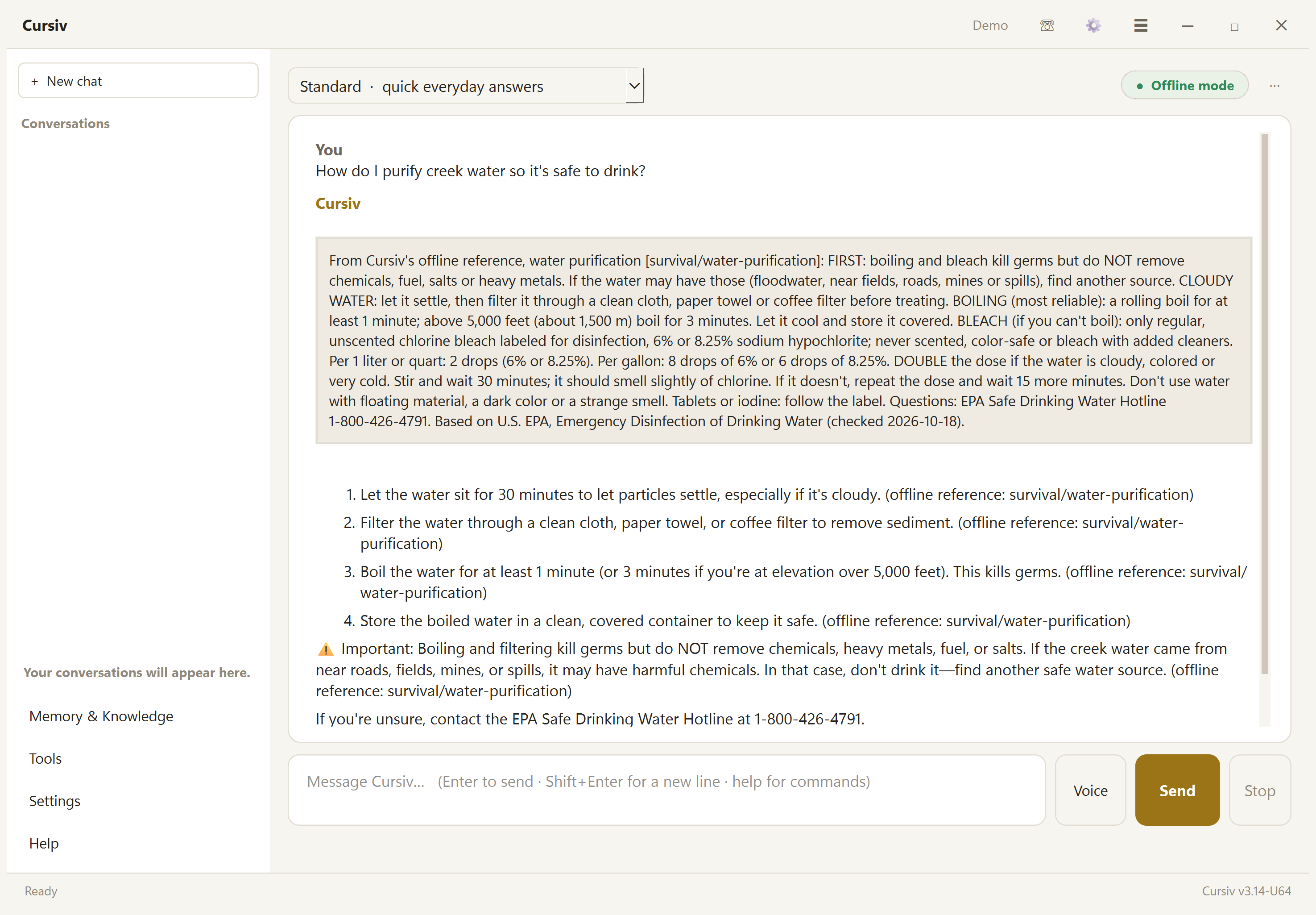
Works offline, and shows its source
The green pill says Offline mode: Cursiv makes no internet connections. For a survival or first-aid question, the reference entry it's using is shown word for word above the answer, with where it comes from (here, the U.S. EPA) and when that was last checked.
-
2
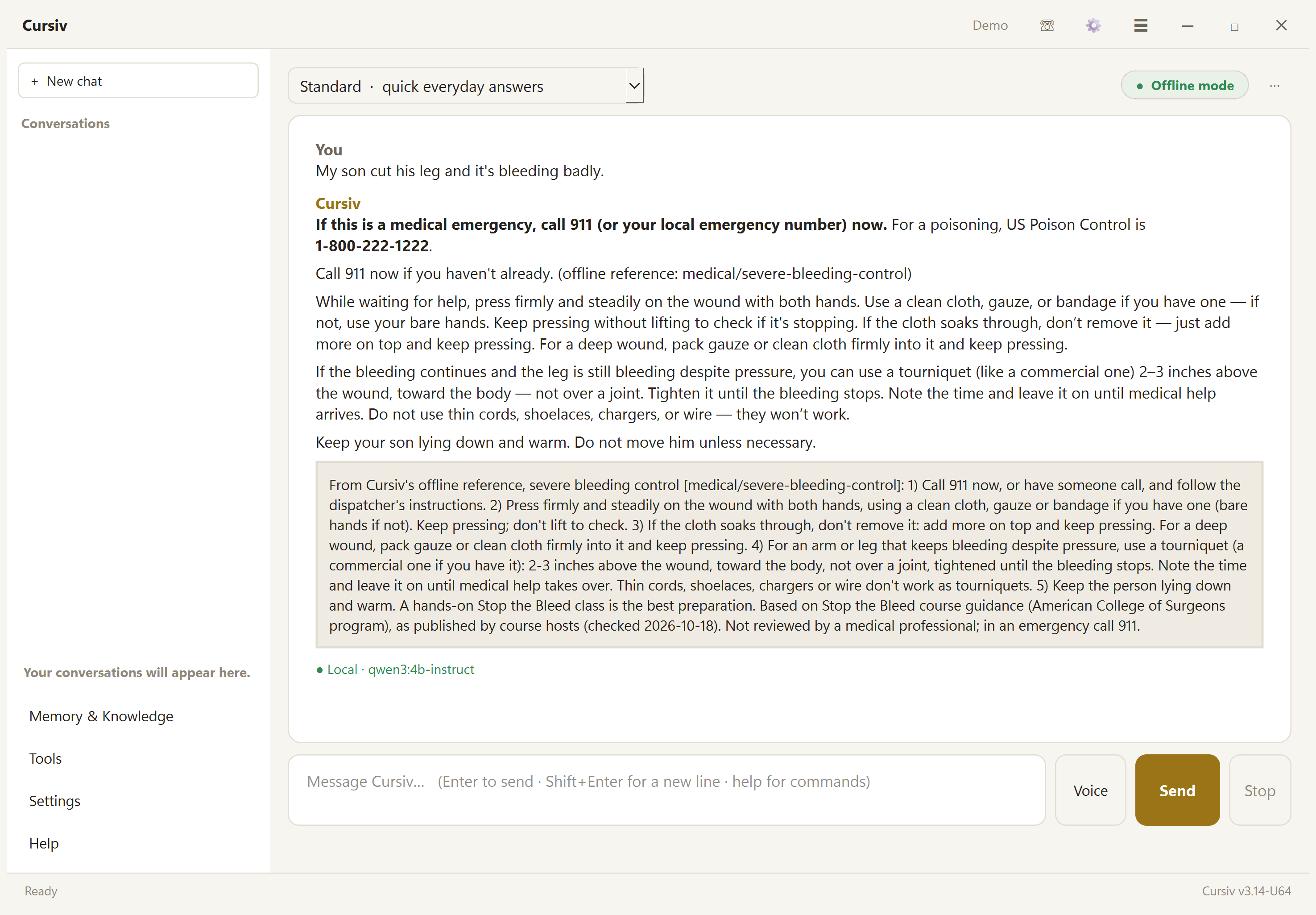
Emergencies come first
A medical emergency gets "call 911" before anything else, then the few steps that matter, from the reference card. If an answer ever contradicts the card, Cursiv flags it under the answer.
-
3
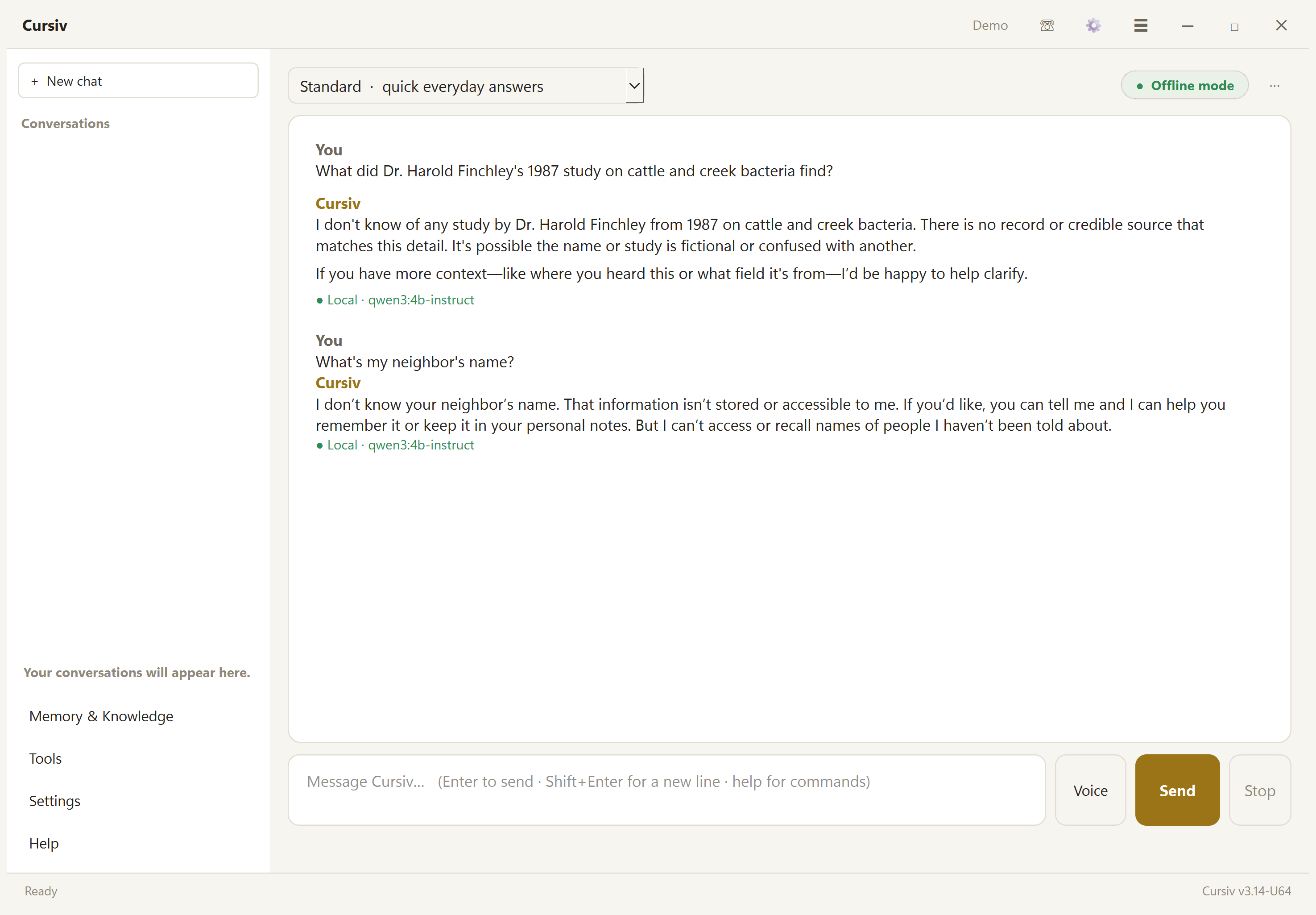
Says "I don't know" instead of inventing
Asked about a study that doesn't exist, or something it can't know, it says so plainly. It doesn't make up a summary or claim to have searched a database.
-
4
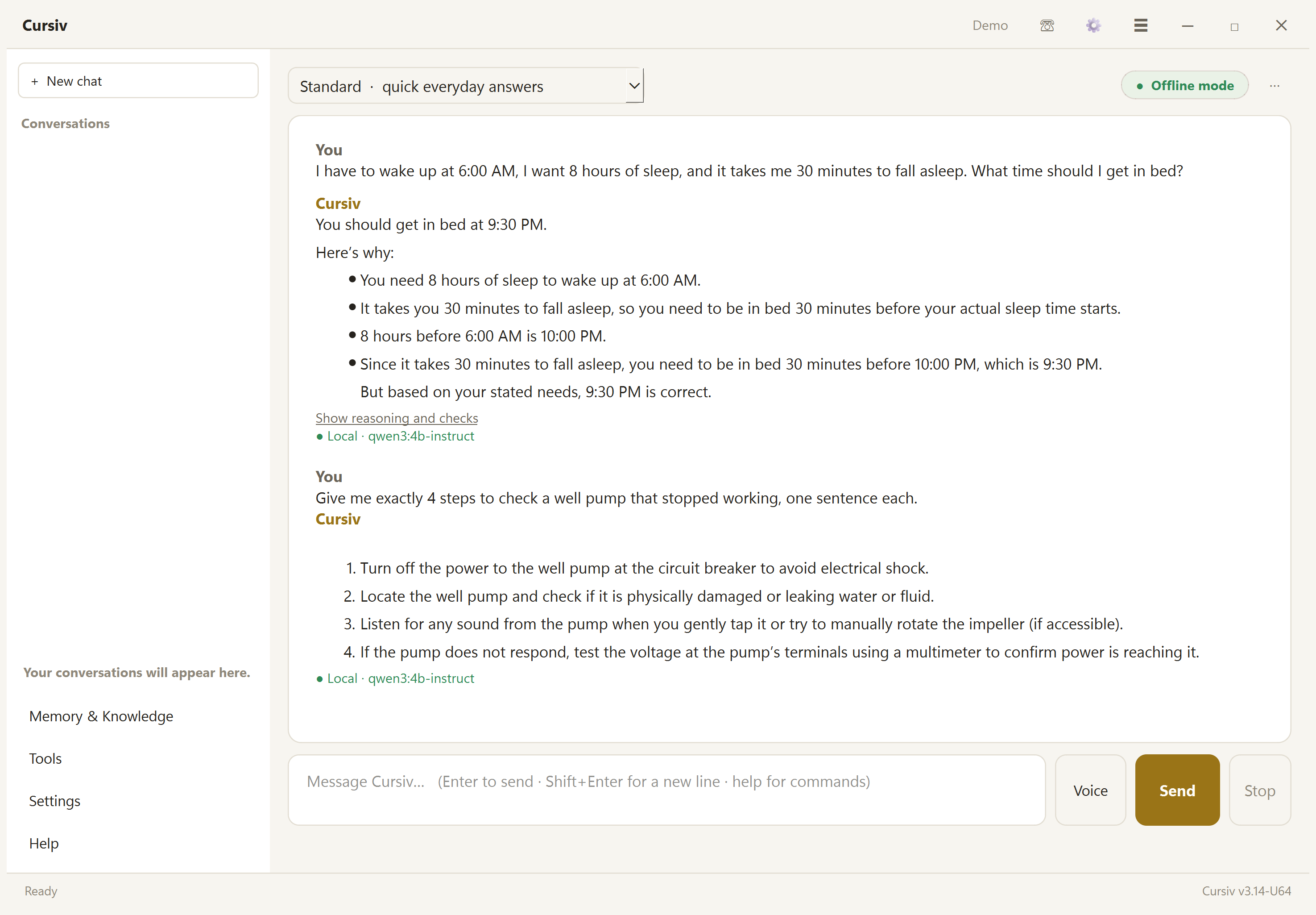
Exact numbers and exact formats
Clock times and sums are worked out by Cursiv itself, not guessed by the model. Ask for exactly four steps, one sentence each, and that's what you get.
-
5
Notes that come back
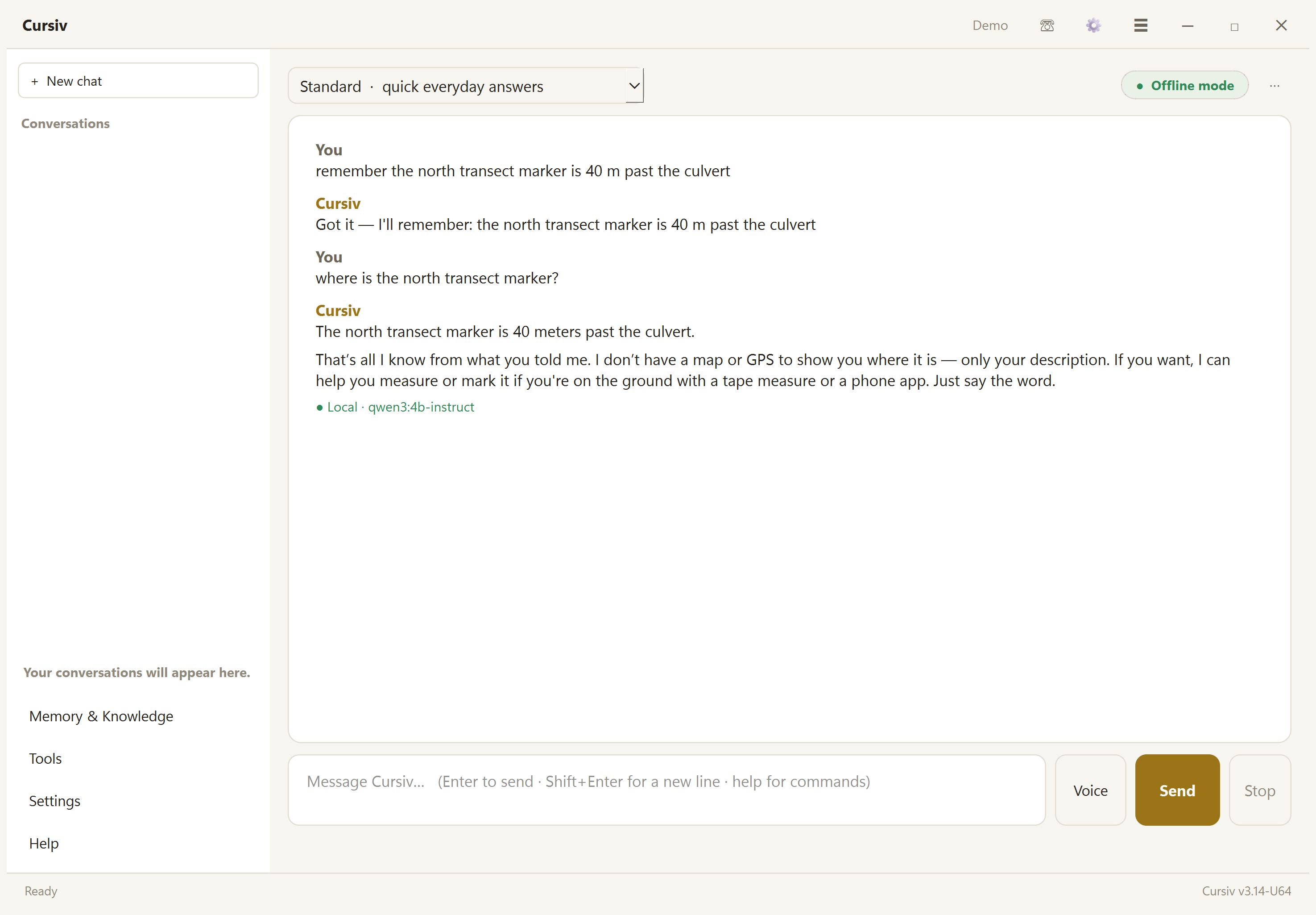
Say "remember …" and Cursiv keeps it on the computer, marked as something you said, with the date. It's still there after a restart; an automated test checks that on every change.
-
6
Asks when a question is unclear
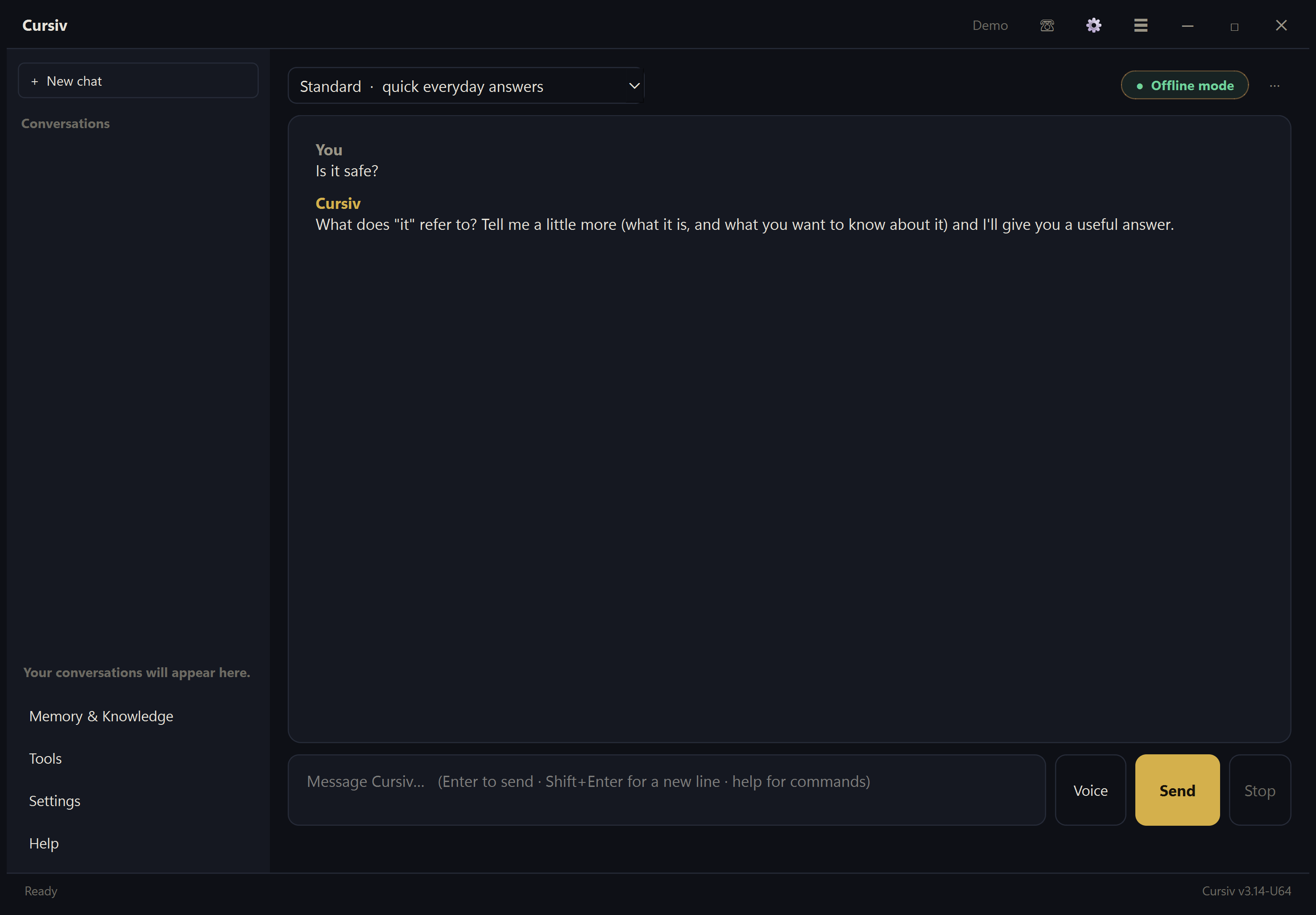
"Is it safe?" with nothing to say what "it" is gets a short question back, not a guess. (Shown in dark mode; Cursiv can follow Windows' light or dark setting.)
-
7
A field notebook where changes show
Observations are kept exactly as typed ("12.40" stays "12.40"), apart from anything the AI says. A correction is a new entry with a reason; the original stays. Every entry is fingerprinted and chained to the one before, so a later change, removal or reordering is detected. That is tamper-evident, not tamper-proof: someone with the files and this computer's signing key could rewrite the whole chain. Export to CSV, JSON or GeoJSON. (Example entries.)
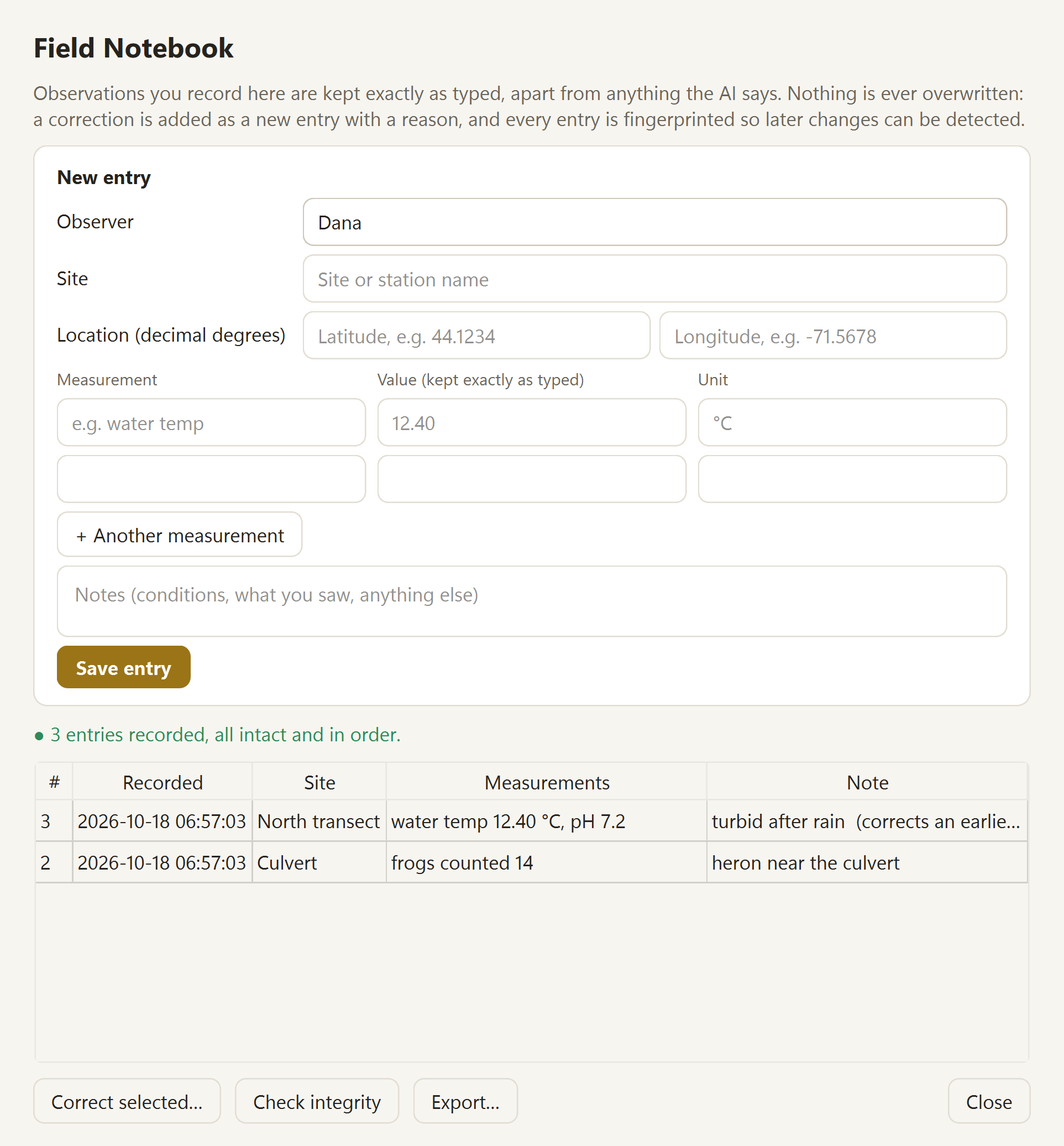
Recorded with scripts/site_shots.py on the source commit and date above. The release notes and replies are saved in
answers.json; these screenshots do not claim to show the current U78 release.
Capabilities and evidence
Every feature, and the evidence behind it
| Capability | Status | Evidence and notes |
|---|---|---|
| Local chat through Ollama | Tested | Live runs on qwen3 4B Instruct; the truth benchmark runs real chat turns on the local model. |
| No connections off the computer on a fresh install (default settings, no keys) | Tested | Chat turns with "this week" / "right now": zero outside connections, recorded by a socket-level audit (scripts/net_audit.py). App start-up watched for 30 s: none. Packet-level capture not done yet. |
| Offline mode (blocks every outside connection, persists across restarts) | Tested | Unit and restart tests, plus one documented 15-scenario offline demonstration on October 18, 2026: all listed checks passed, with outside connections refused and none attempted (OFFLINE-DEMO.md). This covers those scenarios, not every feature or configuration. Packet-level capture not done yet. |
| Answer checking (numbers, named sources, assumptions, one rewrite) | Partly validated | Rule-based checks are unit-tested. How much it improves real answers is what the truth benchmark is now measuring. |
| Offline reference in chat (112 entries) | Tested | 37 entries are written from named public-domain U.S. government sources (CDC, NIOSH, EPA, National Weather Service, National Park Service, FEMA), each showing its source and check date; the rest say they have no published source yet. None has been reviewed by a medical professional yet. Every entry is listed with its source in REFERENCE.md. |
| Memory with origin, date and conflict notes | Tested | Unit tests, and an automated test that a saved note and offline mode survive a restart. Things Cursiv picks up from conversations are always marked as guesses. |
| Saved AI keys encrypted (Windows DPAPI) | Tested | Unit tests. Memories and conversations are not encrypted on disk. |
| Local login | Tested | Fails closed; new accounts need an existing login. A lock on the front door, not disk encryption. |
| Cursiv on a USB drive (portable, no install) | Tested | Copy, verify and update tests; each drive carries a Licenses folder for Cursiv, Ollama and every model on it. A "field copy" starts in offline mode. Not yet tried end to end on a second, clean PC. |
| Truth benchmark (158 cases in suite 1.5) | Tested | Fixed questions are scored with versioned rules. Published run coverage varies by suite; see the method and limitations. |
| Exact arithmetic and clock times | Tested | Worked out in code and given to the model; an answer that disagrees gets a note. Unit tests and a live check. |
| Field notebook (append-only, fingerprinted, CSV/JSON/GeoJSON export) | Tested | Tests for exact values, corrections, detection of changed, removed or reordered entries and of a write cut off by power loss, exports, and surviving a restart; included in the offline demonstration. Not yet used by a field team. See field workflow status and limitations. |
| Field calculations (units, coordinates, UTM, dilutions, statistics) | Tested | Computed in code. UTM checked against an independent method to half a metre at seven places; conversions against reference values. |
| Battery saver and power-loss-safe saving | Tested | Automatic while unplugged. A crash during a save leaves the old file or the new one, never half. Speeds with and without a graphics card: HARDWARE.md. |
| Supporting tools: coding help, sealed family letters, phone link, agents, plugins, LoRA training | Implemented | Working features, outside the benchmark's scope for now. |
| Structured observations, provenance ledger | Planned | Records that keep "what was observed" separate from "what the AI inferred". |
| Several Cursiv computers sharing approved knowledge | Planned | Only after the single-computer system is shown to be reliable. See Direction. |
Measured, not assumed.
The Cursiv Truth Benchmark uses fixed questions and versioned code checks. It tracks defined cases, not general accuracy. Read how the benchmark works and what it cannot show.
- 158 cases in 9 broad categories: general knowledge, reasoning, numbers, reference use, memory, unclear questions, false premises and traps, safety, and questions Cursiv can't know.
- Scored by fixed rules: the right answer or number, invented details, admitting "I can't know", asking when the question is unclear, using the right reference entry.
- Run clean: a fresh copy, no keys, no memories, offline mode on.
- Frozen: cases and checks are versioned (current suite 1.5). Changes are documented; results should be compared only within the same suite version.
Latest documented run
U75, using qwen3:4b-instruct, was rescored against suite 1.5 on 153 cases shared with suite 1.4. The result reports 99.0% accuracy on answerable cases and a 98.7% overall score, with two cases failing. Suite 1.5 now contains 158 cases, so this is not a full run of the current suite. The current app release is U78; no corresponding benchmark run is published. The benchmark is limited to its prompts and scoring checks; it does not mean Cursiv is always right.
All results · U75 failures and causes · How to interpret the benchmark
Architecture
How a question is answered
Everything inside the gold boxes runs on your computer. Dashed boxes are optional and only used if you turn them on.
Where it's going Planned
Structured observations and a provenance record, then several Cursiv computers working together with or without a connection, then a local hub. Each step depends on the one below it being reliable first. Read the direction →
Online only when you turn something on.
With default settings and no keys, everyday chat stays on your computer. These are the only things that send data, and each is off or manual until you use it.
Sends data only when you use it
- AI keys you add: your message goes to that provider when the local model can't answer, or for images.
- Cursiv Cloud: off by default; if turned on, used only when no local model is ready.
- Web search: only for messages starting with
search:, or if you turn on automatic search. - Update check: when you choose Check for Updates (tray icon), or if you turn on automatic checks.
- Phone app: its conversation and photos use this website and need an internet connection.
- Problem reports: sent only when you click Send.
Offline mode
- Blocks all of the above and any other connection off the computer, at the network-socket level.
- Stays on after a restart until you turn it off.
- Local chat, memory, offline reference and saved conversations work with their required files already installed; web features and phone app do not.
Evidence: automated tests and an offline demonstration of 15 checks with no outside connection attempts. Offline use still depends on the model and local files already being installed.
What Cursiv can't do yet.
Small local models make mistakes
A 4B model running on a home PC can be confidently wrong. The answer check catches some errors, not all. Check anything that matters.
Not a medical or safety system
About a third of the reference is written from public U.S. government guidance; the rest has no published source yet. None of it has been reviewed by a medical professional. In an emergency, call emergency services.
Not certified
Cursiv is not certified for medical, safety-critical, aerospace or spaceflight use. Those would need independent evaluation and validation.
Disk encryption
The login keeps people at the keyboard out; it doesn't encrypt memories or conversations on disk. Saved AI keys are encrypted.
Windows first, Mac early, unsigned
The Mac version (Apple Silicon) is built and tested automatically but not yet used by anyone on their own Mac. No Linux version. Neither installer is signed, so Windows and macOS warn on first open.
Speed depends on hardware
Local inference can run on a CPU, but is generally slower than GPU-assisted inference. Model size, memory, context length and other workloads also affect speed. Read the hardware guide.
Especially where the internet isn't reliable.
Farms and homesteads, homeschooling, small businesses, study, DIY projects and code.
Sealed family letters
Write private letters that open only with the code you set for each person. More →
Phone app
Ask about a photo on your phone and pick up the conversation on your PC. This part uses this website. Open it →
Cursiv on a USB
Copy Cursiv, its AI engine and models to a USB drive and run it on any Windows PC without installing.
Inspect the source. Understand how data is handled.
The code, the tests and every result are open for anyone to check. Field notes, measurements, photos, documents and memories are stored locally. Optional online providers receive the content needed for a request when you choose to use them; the website-based phone app has its own data path. See the privacy guide for details. What stays, what can leave, and when →
Repository
Full source, MIT license.
How it's built
TECH.md: the app, chat engine, memory, checks and build.
Truth benchmark
Cases, scoring rules and results.
Model licenses
Which models Cursiv uses and their terms.
Changelog
Every release, including past defects and fixes.
Releases
Installers for every version.
Report a problem
Open an issue on GitHub or review existing reports.
Good to know.
Is Cursiv free?
Yes. Cursiv is open source under the MIT license. Free Gemini and Groq keys are optional; paid keys only if you want them.
Do I need to be online?
Once, to download Ollama and a model during setup. After that, with a local model installed, everyday use works without internet.
Windows warned me about the installer. Is it safe?
The installer isn't code-signed yet, so Windows shows "unknown publisher". Click More info → Run anyway. The source code it's built from is public.
Is the AI always right?
No. It can be confidently wrong, especially with a small local model. Cursiv checks numbers and sources and says when it can't know, but check anything important, especially health, money and legal questions.
Does it work on Mac or Linux?
Mac: an early version for Apple Silicon Macs (M1 or newer) is on the download page; it's built and tested automatically on Apple hardware but hasn't been tried by a person on their own Mac yet, and the USB drive is Windows-only. Linux: not yet.